THOUSANDS OF FREE BLOGGER TEMPLATES

Notice

My Daughter was born on Feb 14, 2010 and she is wonderfully healthy! Thank you for all the wonderful emails about everything. I just wanted to say that for right now since life has gotten so busy I am working mainly on tags and layouts. There will be the occasional tutorial but not as many as before. I am sorry if this causes any problems, but family comes first! I hope this finds all my followers doing well! Blessed Be! ~Lori

Quick Links

These are the Quick Links to my most used supplies =]

PSP
Alien Skin
Vix
Squirlz Water Reflections
Garvey
Gorjuss
Animation Shop
Showing posts with label Carey's Designs. Show all posts

Thursday, April 2, 2009

FIRST KIT


A friend (Carey from Carey's Creations) and I decided to make a kit for Autism Awareness Month, we hope you enjoy it.


CONTENTS:

1 Alpha (caps and lower case)
4 borders
3 bows
3 word art
6 papers
girl and boy
3 puzzle pieces
4 frames
2 flowers
5 assorted elements
Send results to Lori at Leomom09@aol.com. You can use either Lori or Carey's names in the tags Ü

Thursday, January 29, 2009

Love Conquers All


Tutorial by ButterflyLori a working knowledge of PSP is required. Any resemblance to any other tutorial is purely by accident. Enjoy.
Scrap Kit: By Careyscreations4you FTU and can be found here
Art: By Suzanne Woolcott available for licence at here
Mask: WSL 122 FTU and included here
Font: Edwardian Script
  • Open New canvas 700x700 fill color does not matter.
  • Flood Fill with color of choice or paste paper of choice.
  • On a new paper load the mask and copy and paste over base layer, move and add drop shadow as you wish for your effect.
  • With the mask layer still your working layer add Depth of field as below, you can adjust to your liking.:
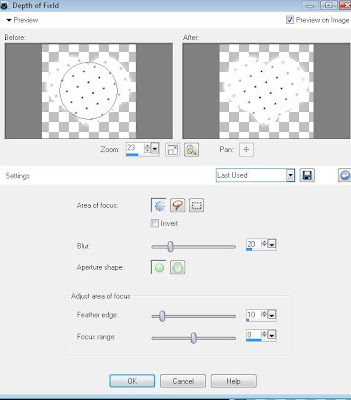
  • make selection of inside heart, invert, save to disk.
  • Load tube of choice, load selection, cut out what is not needed, drop shadow if desired.
  • Add embellishments, word art and copyright info.
  • Resize if desired and save!
I hope you enjoyed this tutorial. Blessed Be ~Lorilynn